GETTING STARTED
Start Your Publishing Journey
Publishing your book with us is simple and straightforward. Choose a publishing plan, complete the 5-step submission form, make your payment, and our team will take your book through the publishing process.
How Publishing Works
Follow these four simple steps to get your book started.
Start Publishing
Begin your publishing journey from the publishing section and get started with your book.
Choose Your Plan
Select the publishing plan that best suits your book and publishing requirements.
Complete the Form
Provide the required book, author and publishing information through the 5-step submission form.
Make Payment
Complete the initial payment (20%) for your selected publishing plan and submit your publishing request.
Before You Start
You can begin your publishing journey directly through our website. If you already have the following basic materials ready, keeping them with you will make the process easier.
Author Name
Keep the author's name ready exactly as it should appear in the book and publishing information.
Book Title
Keep the final title of your book ready.
Author Photo
Keep a clear, good-quality author photograph ready.
Manuscript
Keep your completed manuscript ready.
Supported formats: PDF or DOCX
Bio and Blurb
Keep your author bio and short book description ready (50-150 words).
Ready to Publish?
Start your publishing journey by choosing a plan and completing the 5-step publishing form.
Start PublishingAlready Have These Materials Ready?
If you already have your Author Name, Book Title, Author Photo and Manuscript (PDF or DOCX) ready, you can also share these materials with our team on WhatsApp before completing the publishing process.
WhatsApp is an additional way to share your basic materials. To proceed with publishing, you will still need to complete the 5-step publishing form and complete the payment for your selected plan.
Complete Your Book Submission
After choosing your publishing plan, you'll complete a 5-step form with the information required to process your book.
01
Create Your Book Profile
02
Build Your Book
03
Reach Your Readers
04
Legal & Identity
05
Review & Confirm
Complete Your Payment
After completing the submission form, review your selected publishing plan and complete the payment to submit your publishing request.
Your publishing process begins after your submission and payment have been successfully completed.
01 — START PUBLISHING
Start Your Publishing Journey
Open our publishing website to begin your publishing journey. The Home Page may look slightly different depending on the device you are using.
Choose your device below to see the relevant guide.
Open the Website on Your Desktop
Open the publishing website in your desktop or laptop browser. From the Home Page, locate the Start Publishing button and click it to begin.
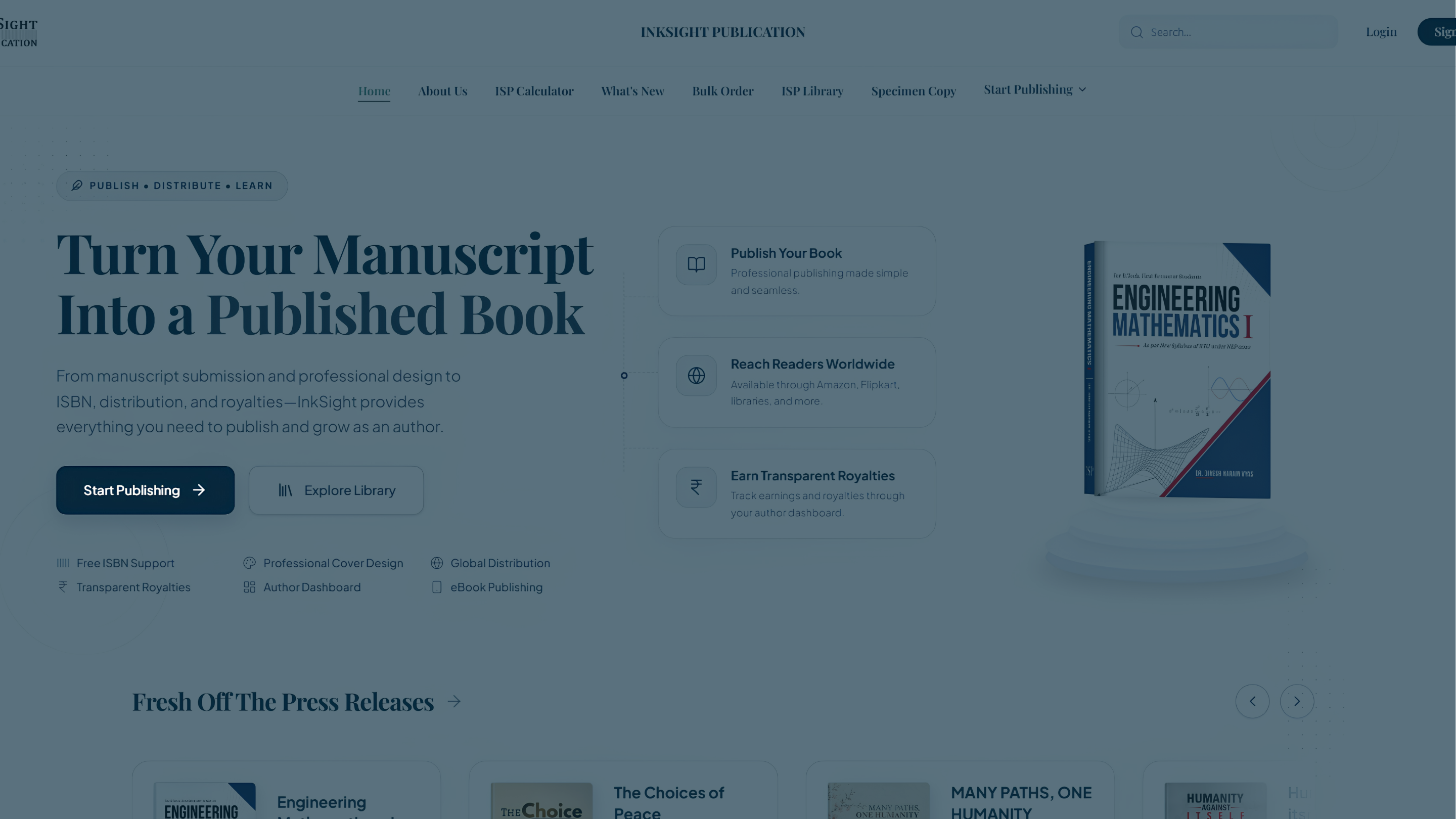
Look for: Start Publishing
Click this button to begin your publishing journey.
Ready to Continue?
Once you find Start Publishing, click or tap it to begin the publishing process.
Start Publishing02 — Choose Your Publishing Plan
After selecting Start Publishing, you will be taken to the publishing plan selection screen. Choose the plan that best suits your publishing requirements before continuing to the submission form.
02 — CHOOSE YOUR PUBLISHING PLAN
Choose the Right Publishing Plan
After starting the process, you will be presented with our publishing plans. Choose a plan that fits your publishing goals, or build a custom package with exactly the services you need.
Choose your device below to see how the plans screen looks.
Choose Your Plan on Desktop
Review the available publishing plans on your desktop or laptop. Compare the features of Basic, Master, Legendary, and Custom plans side-by-side.
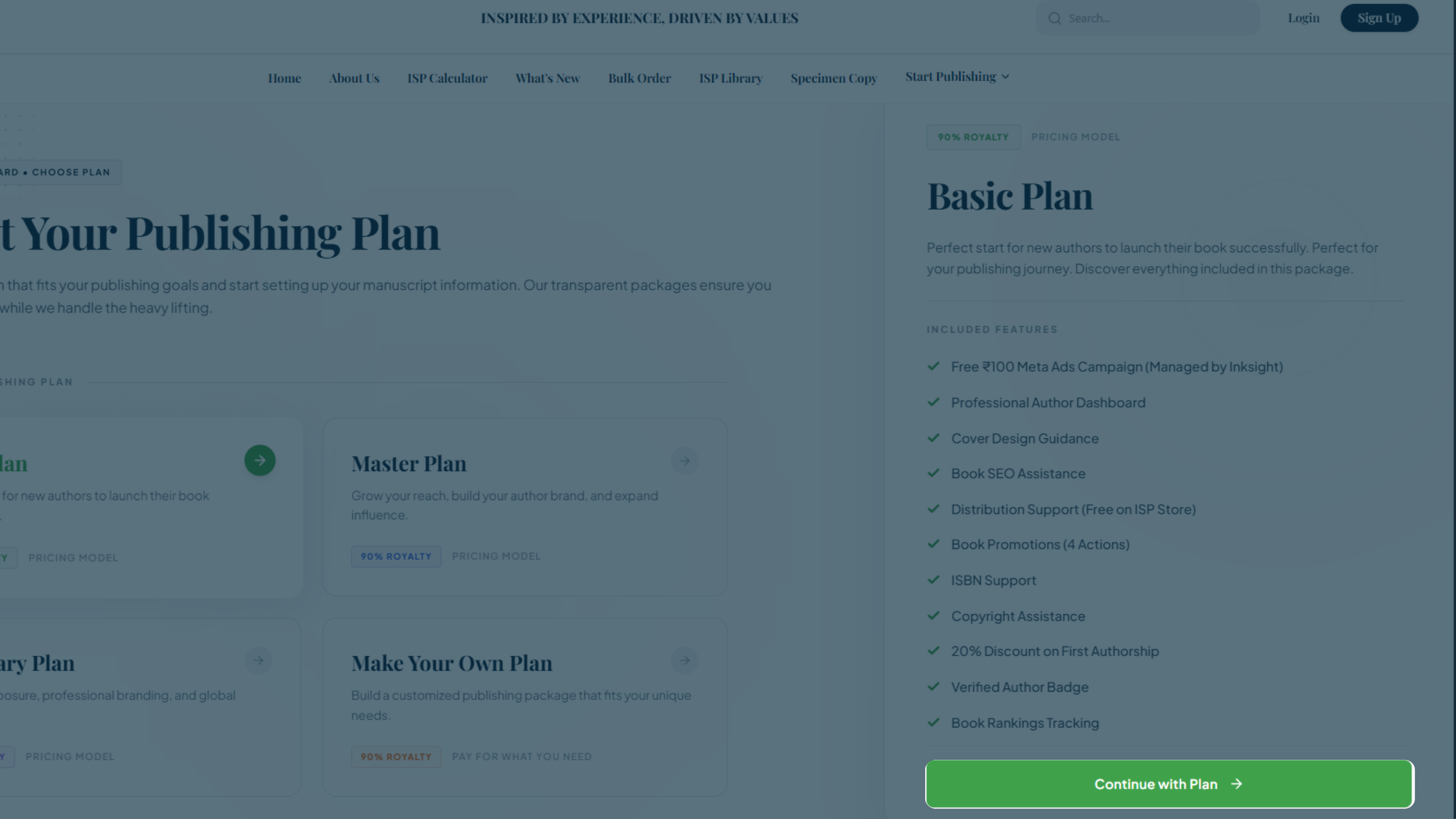
Look for: Your preferred plan
Select the plan that best fits your needs to proceed.
All plans are subject to manuscript requirements, publishing specifications, and applicable service terms. Final pricing and available services are shown before checkout.
03 — Complete Your Submission
After selecting a plan, you will proceed to the 5-step submission form where you'll provide your book details, manuscript, and author information.
YOUR SUBMISSION
The 5-Step Publishing Form
After choosing your plan, you will fill out the Author & Book Information Form. Here is a breakdown of the 5 steps and the information you will need to provide.
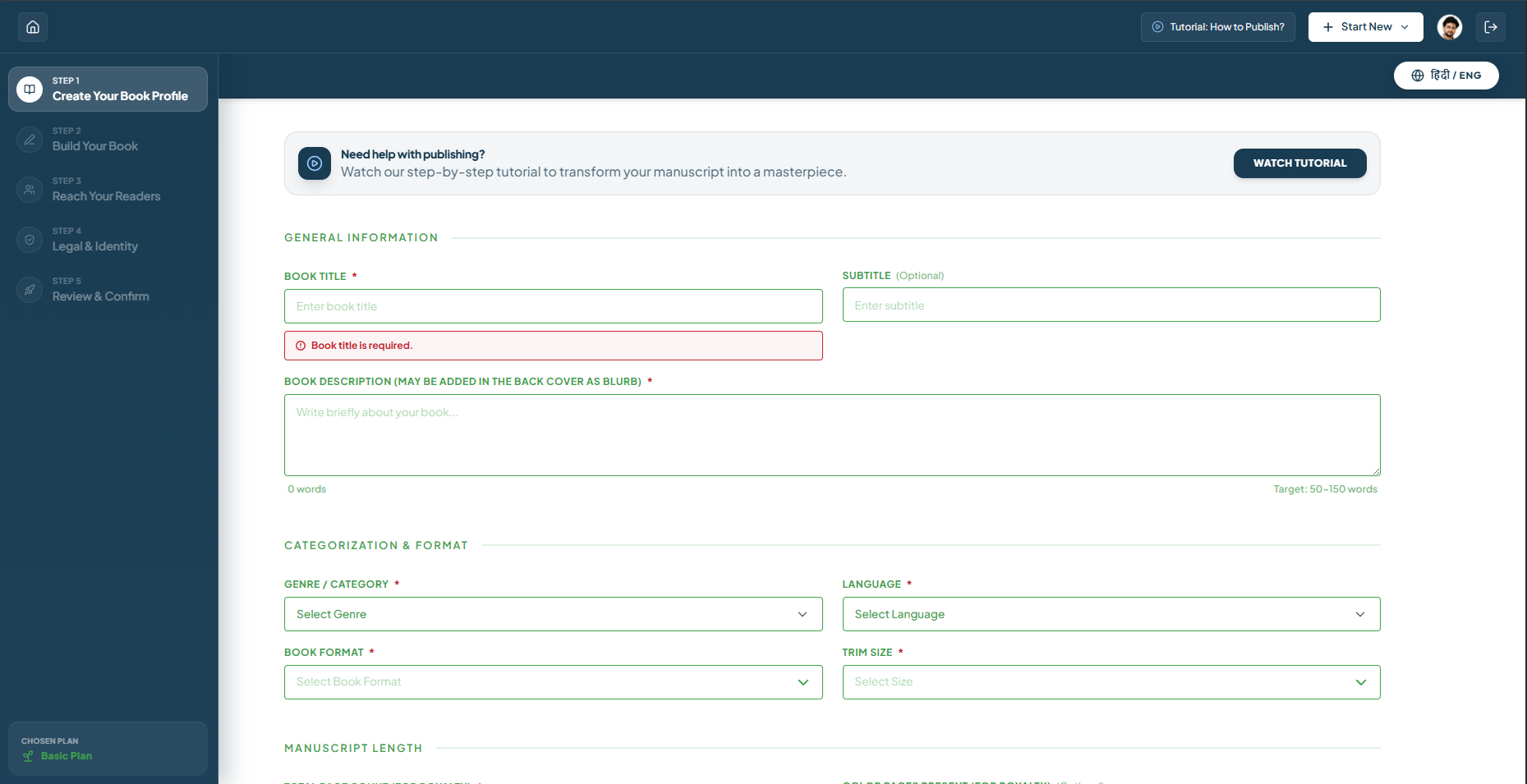
Create Your Book Profile
The first step collects essential information about the author. This ensures we can properly credit you and maintain communication throughout the publishing process.
Required Details
- Author Details (Name, Age, Phone Number, Email, Pen Name, Location, Biography, Profile Photo)
- Book Title & Subtitle
- Book Type (Fiction, Non-Fiction, Poetry, etc.)
- Category / Genre (e.g., Science Fiction, Self-Help)
- Book Language
- Short Description (A catchy 1-2 sentence pitch)
- Long Description (The full blurb or synopsis)
- Estimated Page Count
Build Your Book
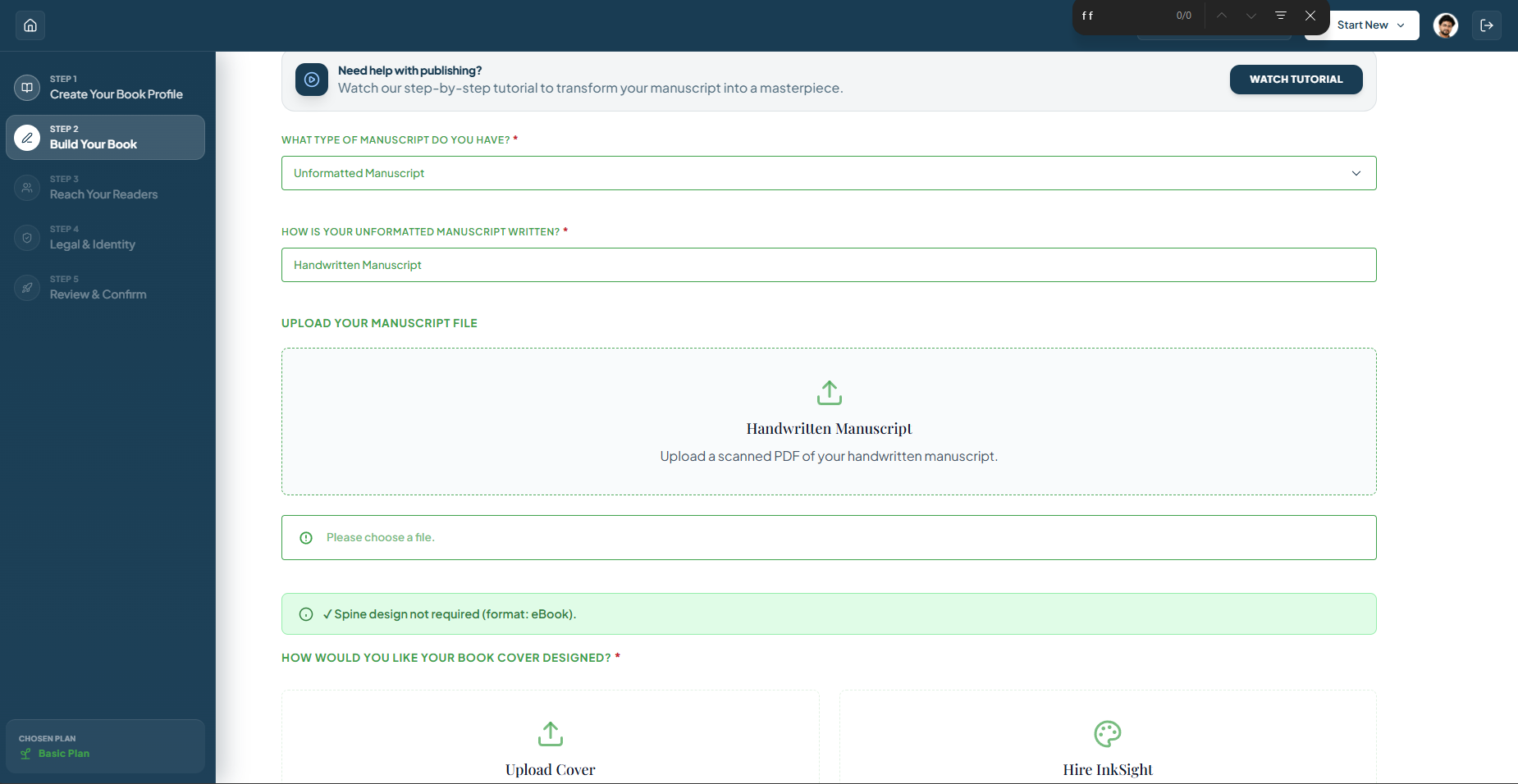
Here you provide the core metadata for your book. This information is crucial for cataloging, categorization, and helping readers find your work.
Required Details
- Manuscript Upload (Supported formats: PDF, DOC, DOCX)
- Cover Preference (Whether you have a cover or need one designed)
- Front Cover Upload (If you already have a design)
- Back Cover & Spine Uploads (Optional)
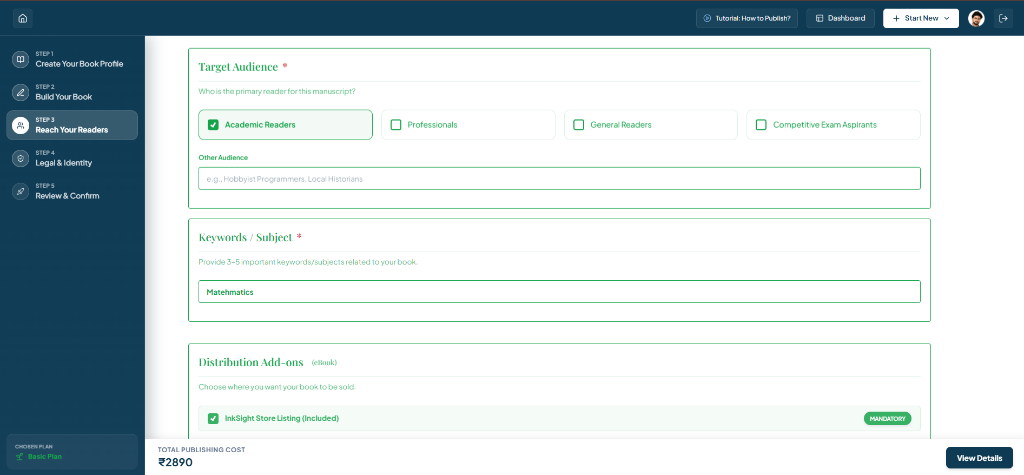
Reach Your Readers
Provide information about your target audience and distribution preferences to ensure your book reaches the right readers.
Required Details
- Target Audience & Reader Demographics
- Keywords & Subject (For SEO and discoverability)
- Distribution Add-ons (Select preferred sales channels)
- Promotional Add-ons (Social Media, Author Spotlight, etc.)
- Article Publications (Medium, Quora, LinkedIn, etc.)
Legal & Identity
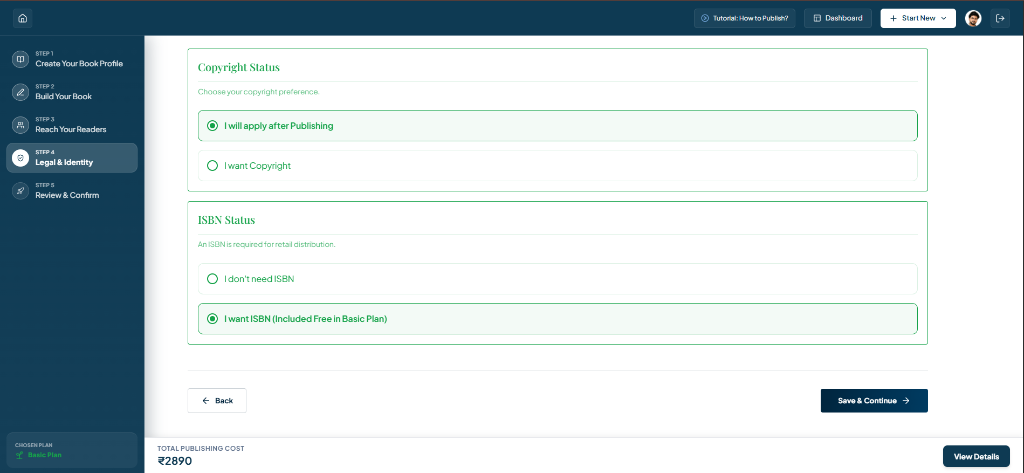
Establish the legal foundation for your book by setting your copyright preferences and ISBN status.
Required Details
- Copyright Status (Choose your copyright preference)
- ISBN Status (Whether you need an ISBN or not)
Review & Confirm
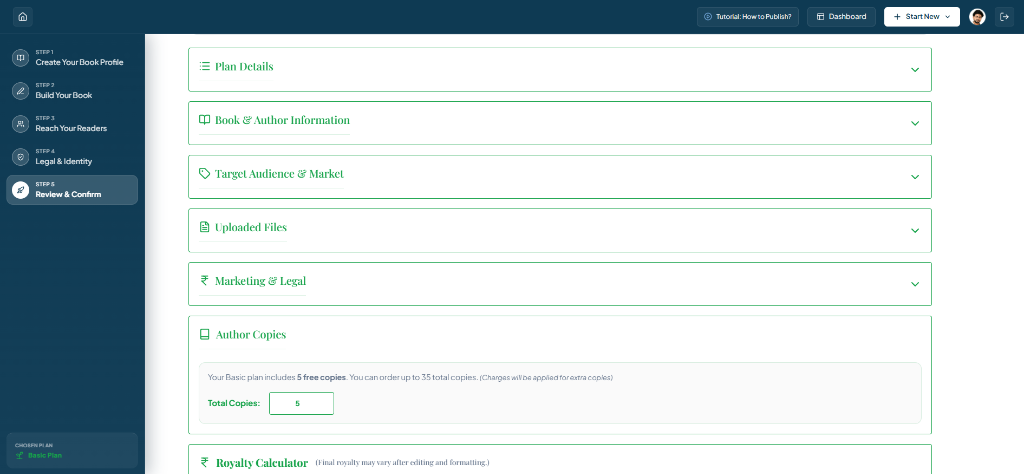
The final step allows you to review all your entered information, confirm its accuracy, and officially submit your publishing request.
Required Details
- Review All Details (Author, Book, Uploads, Marketing & Legal)
- Author Copies (Request copies for yourself)
- Royalty Calculator & Retail Price (Set MRP and estimate earnings)
- Cost Estimate & Payment (View breakdown and make the initial 20% payment to be pay )
- Final Declarations & Submission (Agree to terms and submit)
Publishing Progress Tracking
Once your submission and payment are complete, your book moves into the publishing process. Here is the complete journey your book will take.
1. Initial Payment DoneEmail Update
Your initial payment has been received and your publishing process is officially started.
2. Editorial Screening & PlagiarismEmail Update
Your manuscript is checked by the editorial team for quality, originality, and plagiarism.
3. Editing & FormattingEmail Update
Your manuscript is professionally edited and formatted according to publishing requirements.
4. Manuscript Review & FeedbackEmail Update
The edited manuscript is shared for your review and feedback before moving ahead.
5. Exterior Design & ReviewEmail Update
Your book cover and other exterior design elements are prepared and sent for your review.
6. ISBN AllottedEmail Update
An ISBN is assigned to your book for identification and publishing.
7. Balance PaymentEmail Update
The remaining publishing payment is completed before the book moves to production.
8. Production (eBook/Print)
Your final book files are prepared and processed for eBook and/or print production.
9. Distribution on Other Platforms
Your published book is submitted for availability across the selected distribution platforms.
10. Published SuccessfullyEmail Update
Your book has completed the publishing process and is now successfully published.